

Paneltastic Member Guide
A brief guide to the basics of the site and membership
Paneltastic offers visitors the opportunity to sign up for a free account. This will allow you access to more features over time and unlock special series made only for members. There are currently no fees involved in obtaining a Paneltastic membership but you will be required to provide a valid email address.
Creating An Account
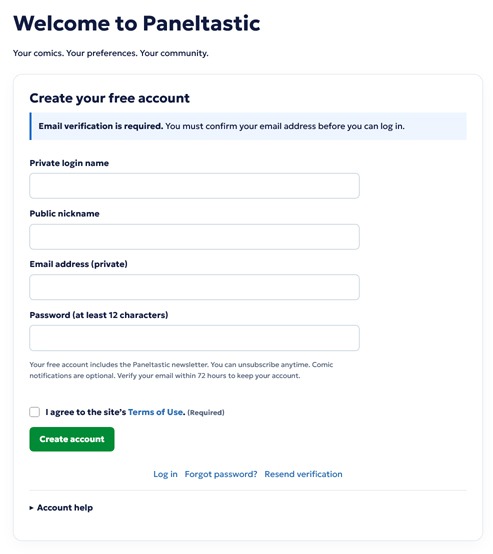
To begin, click the ‘CREATE ACCOUNT’ button at the top of the website.
On the creation screen, fill in all of the details.
Private login name – This is the username you’ll use to log into the website.
Public nickname – This is what people will know you by on the site.
Email address – This is your email. Make sure it’s valid as you’ll have to verify it.
Password – Your account password. This must be at least 12 characters.
You must agree to the sites terms of service before you can submit your registration. You can click the provided link and browse the terms before you register if you desire.
After everything is filled in, click the ‘CREATE ACCOUNT’ button at the bottom of the form.
Verifying An Account
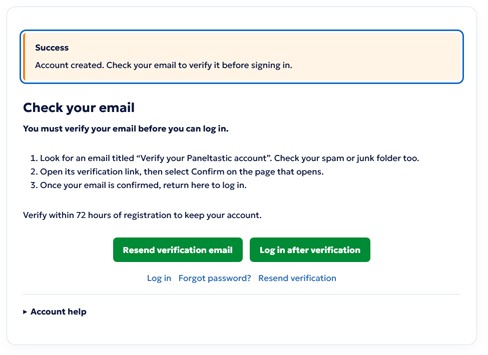
If your submission was successful, you will see a screen like this with the success message at the top. If you see another message, carefully read the instructions and follow them to successfully submit your registration.
Once you’re at this screen, you should soon receive your verification email. You must either click the button in the email or copy and paste the unique URL into your browser and go to it. Once there, you will see a button to verify your account that you must click. When you see the success message there, you’re ready to log in.
Once you log in, you’ll see a ‘MY ACCOUNT’ button at the top of the site. Clicking it will take you to your member control panel which will allow you to adjust your settings on the site.
Account Details
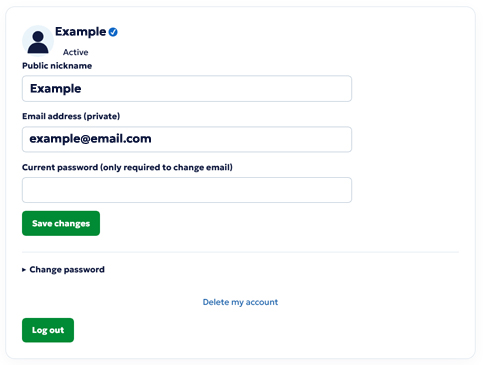
This is where you’ll see options related to your login and account in general.
Public nickname – This is the name you chose when you signed up. You can change it if you desire but it must be a name that is available and not against our naming rules. You may only change your name once every 30 days.
Email address – You can change this but it will require your current password and you must confirm the change before it takes effect.
Current password – Used as part of changing your account email address.
You can change your current password but it will require the old password and doing so will sign you out of all sessions on the site.
You may also delete your account by clicking the link and following the directions.
If you are an ‘ESTABLISHED MEMBER’, you will see a verification checkmark next to your name at the top along with your selected avatar.
Reading Preferences
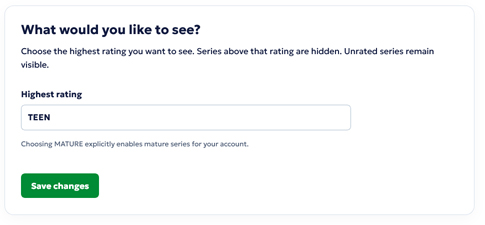
Every series on the site has a content rating applied to it. As a member, you can choose how high of a rating you wish to see while browsing the site. Anything above your chosen rating will not display and you will be unable to access it unless you raise your current rating level in your control panel.
When your account is created, it defaults to TEEN.
Email Subscriptions
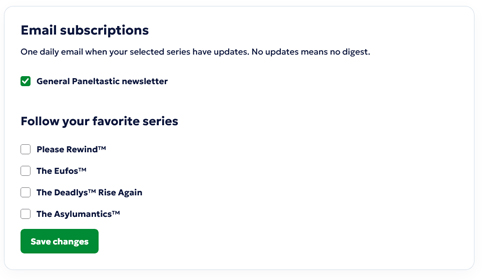
This is where you control what emails you receive from us. By default, you get access to our newsletter which will provide important updates regarding your membership and the site. We highly recommend not turning this off but it’s your choice.
You can also select which series you’d like to receive update notices for each time a new comic is posted. Just check which comics you are currently interested in and you’ll receive an email with direct links for each one.
To keep the emails at a minimum, you will only receive one per day on a day your strip updates and if you have several strips that update at the same time you’ll get one email with all of the updates listed in it.
Avatars
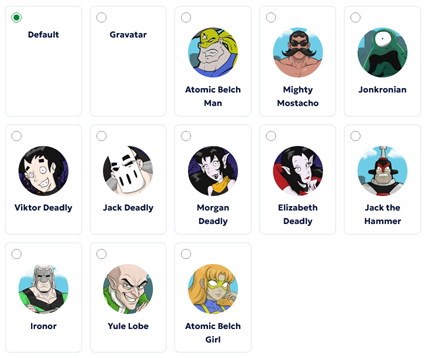
One of the perks of having a member account is you get several choices when it comes to what avatar you’d like to represent you on the site.
Default – This is just a generic “shadow person” icon.
Gravatar – If you signed up with an email attached to an avatar using this service, this will allow you to use it here.
Regular Avatars – These are a selection of Paneltastic character avatars offered for members to use. Just click on your favorite, save your changes and it will become your avatar. All members have access to this pool of characters.
Exclusive Avatars – This special collection of character avatars are only for Established Members and are not offered to regular members.
At this time, we do not offer the ability for users to upload their own avatars but the selection of avatars available will grow over time.